Your shop has the answers. Now you can just ask.
Connect Claude to Juno and ask about sales, stock, orders, cost prices and what the courier actually charged. Claude checks several parts of your shop data in one go, so "are we making more money on roof racks?" gets an answer with the figures behind it, without exporting three reports.
Our roof rack sales are up. Are we actually making more money?
- Sales
- Cost prices
- Courier invoices
- Stock
- Roof rack revenueOctober against September
- +40.3%
- Freight from courier invoicesmostly Flatlines to WA
- +88.1%
- Left after product cost and freight$6,726.82 on shipped orders, ex GST
- +33.3%
See what Claude can do with your shop.
These are questions you can ask once Claude is connected to Juno. Pick one: Claude calls Juno's tools, the tag on each call shows which data it read, and then it answers. When something would change, it shows a preview and waits. A simulation with a made-up shop and illustrative numbers.
Pick a question to see what Claude does with it.
Sales reports, cost prices and freight need the Insights permission. Freight figures cover shipped orders with uploaded courier invoices; pickups have no freight and aren't in them.
Revenue is one number. What you keep is another.
Juno has the data for both: what sold, what each product cost you, and what the courier invoiced for each consignment, down to SKU and postcode. Claude can put them side by side in one conversation, and says which figures are exact and which aren't.
From sales to what is left over
Revenue from your orders, minus product cost from your cost prices, minus freight from the courier invoices you upload in Juno. The example on the right is the roof rack question from the demo.
From the courier invoice
Freight comes from the carrier invoices you upload under Freight, matched to the order. Not a rate card, not an average.
It says what it can't know
Several products in one box: the freight is split by weight and counts as estimated. Pickups and months without invoices are left out, and Claude says so.
Sales, stock and the shelf
Top sellers with their trend, what is running low, and what has had stock but no sale for months, with the money tied up in it.
Searches and watchlists
Searches on your website that found nothing in the last 7 days, and products customers saved and are still waiting on.
Figures, not decisions
Claude shows its numbers and where they came from, and points at what could be worth a look. Whether you change a price or a carrier is up to you.
Two minutes from settings to your first question.
More than another reporting dashboard.
Sometimes you need a number. Sometimes you need to find an order. And sometimes you want to get something done. Claude can use the Juno tools your account may use to look things up and, for a few jobs, to do them, after you say yes.
- 1 / ASK
Ask
"New order for Sam Patel: the Lumen Pro 42 light bar and the twin light harness, pickup. Send him a payment link."
- 2 / REVIEW
Review the preview
Claude finds the customer, prices the order at your current shop prices and shows you a preview: items, total, pickup or shipping, and what the customer will be emailed. Nothing is created yet.
- 3 / CONFIRM
Say yes, or don't
Say yes in the chat and the order is created in Juno. Say no and nothing changes. Order notes and new vehicles work the same way.
Claude only gets the access you allow.
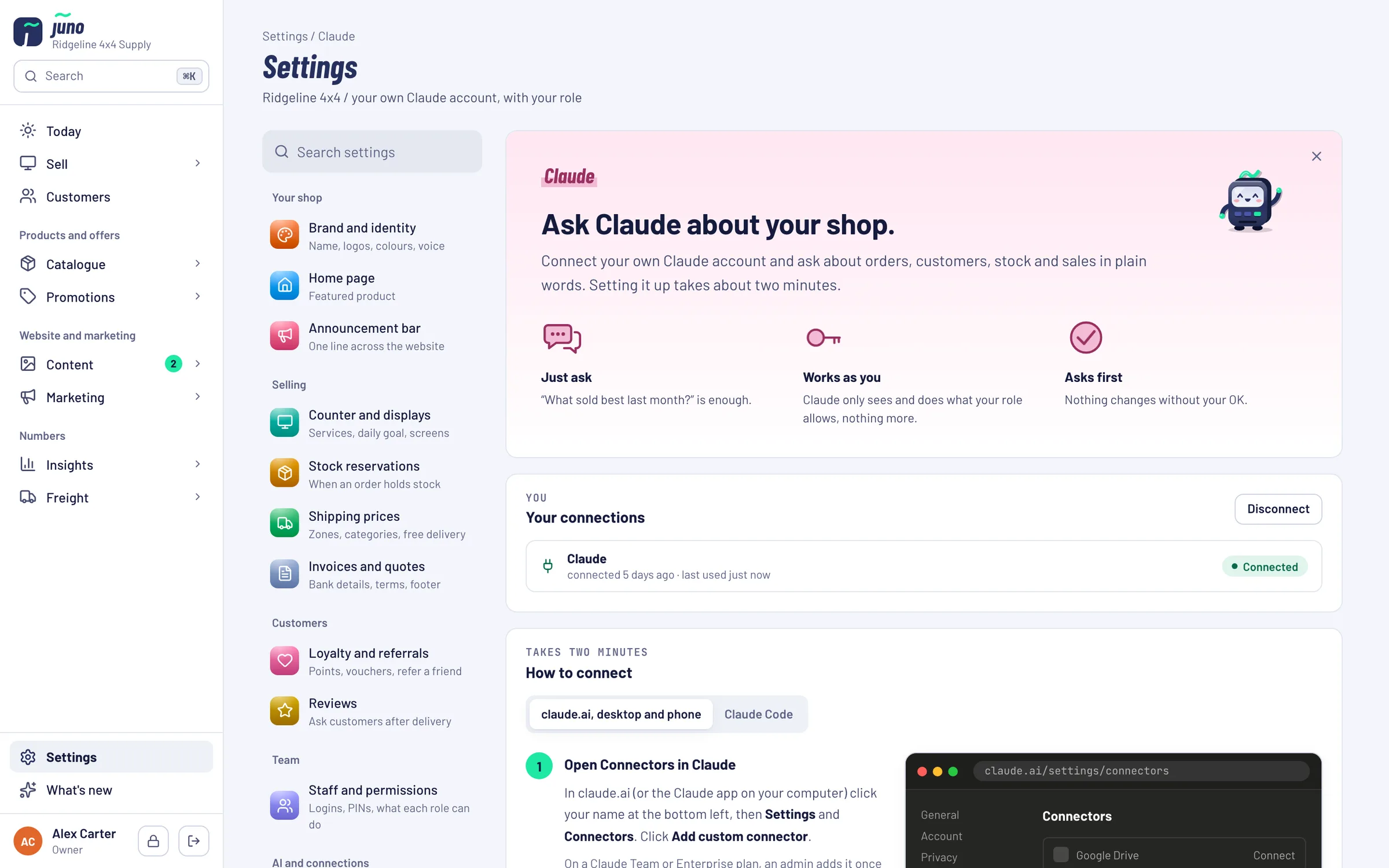
Connecting Claude doesn't hand over your shop. It signs in as one Juno user, and that user's role decides which information and which jobs Claude can reach.
How does it work?
Claude connects to Juno through the Model Context Protocol (MCP), a standard that lets AI assistants use other software's tools and data. Juno provides the tools. Claude works out which ones your question needs and uses those your account may use.
You don't need to understand MCP to use it.
- 1Add Juno to ClaudeIn claude.ai: Settings → Connectors → Add custom connector, with the address shown in Juno under Settings → Claude.
- 2Sign in and allowClaude opens Juno. Sign in, check which user and permissions Claude will act with, and click Allow.
- 3Ask about your shopIn plain words, on the computer or in the Claude app on your phone.
- 4Review before anything changesFor an order, a note or a vehicle, Claude shows a preview first and goes ahead only after you say yes.
For the technically curious
- Connection
- Juno's API runs an MCP server over HTTPS. Claude signs in with OAuth: Juno's own sign-in and consent page, then a token tied to one staff account. Claude never sees a password.
- Tools
- 18 tools. 15 only read: products, orders, customers, sales, top sellers, low stock, slow movers, shipping margin, watchlists, vehicles and more. 3 change something: create_order, add_order_note and create_vehicle.
- Confirmation
- The three writing tools refuse to run without confirm: true, which Claude only sends after you agreed. create_order first returns a priced preview, and by default a second order for the same customer within 10 minutes is refused, so a retry can't create two.
- Permissions
- Each tool needs a Juno permission (Sell, Orders, Products or Insights). Tools the signed-in role doesn't have aren't listed for Claude and are refused if called.
- Amounts
- AUD incl. GST, except shipping margin, which is ex GST. Freight comes from uploaded carrier invoices; on orders with several products it is split by package weight and marked as estimated.
- Logging and limits
- Juno doesn't log tool arguments or answers. Requests are rate-limited per IP address and per staff account.
Want Juno and the people behind it?
Partners get Juno set up for their shop, Claude integration included, as part of a store we build and run for them.
Just want Juno? Book it on its own: Pricing on request.
Book a Warehouse Walkthrough →Questions about Claude and Juno
asked in plain wordsYes. Each person who wants to ask Claude uses their own Claude account at claude.ai and adds Juno there as a custom connector. The address and the steps are in Juno under Settings → Claude.
The connection is part of Juno; there is nothing extra to buy from us for it. Claude itself is a separate product from Anthropic, with its own plans and prices. Which Claude plans can add custom connectors is up to Anthropic, so check their current plans at claude.ai.
It can do three things, each only after you said yes to a preview in the chat: create a counter order (pickup or shipping) and email the customer how to pay, add an internal note to an order, and add a vehicle to your vehicle list. It can't change products, prices or stock, cancel or refund orders, or take payments.
Yes. Each staff member connects their own Claude account with their own Juno login, and Claude gets that person's role. Staff without the Insights permission don't get sales reports, cost prices or freight figures through Claude either.
Products with price and stock (cost prices with the Products or Insights permission), orders and unpaid orders, customers and their order history, sales for any period, top sellers, low stock and slow movers, shipping margin from courier invoices, watchlists, website searches that found nothing, and your vehicle list.
No. Only what those tools return, and only the tools your role may use. Settings, staff accounts, passwords and payment keys are not reachable. What a tool returns, including customer details when you look up an order, is sent to Claude to write the answer, under the terms of your Claude plan.
Yes. In one conversation Claude can call several tools and put the results together, for example sales, cost prices and courier invoices for the roof rack question in the demo. It can only combine what the tools return: freight figures cover shipped orders with uploaded courier invoices, not pickups.
Any time: in Juno under Settings → Claude, or in Claude under Connectors. Owners see every connection under Staff and permissions and can end any of them. Deactivating a staff member disconnects them too.
The AdHoc Assistant is a separate Vendos product. The Claude integration is part of Juno: you use your own Claude account, and Claude works with your Juno data through the tools your role allows.
See Claude work with your own numbers.
In a demo we connect Claude to a Juno shop with demo data and ask the questions you bring.